SEO Troubleshooting Guide: How to Diagnose and Fix Any SEO Problem
Your complete 2025 guide to systematic SEO problem diagnosis and proven solutions that work
Here’s the truth about SEO troubleshooting: most people waste weeks trying random fixes instead of diagnosing the actual problem. You’re about to learn a systematic approach that works.
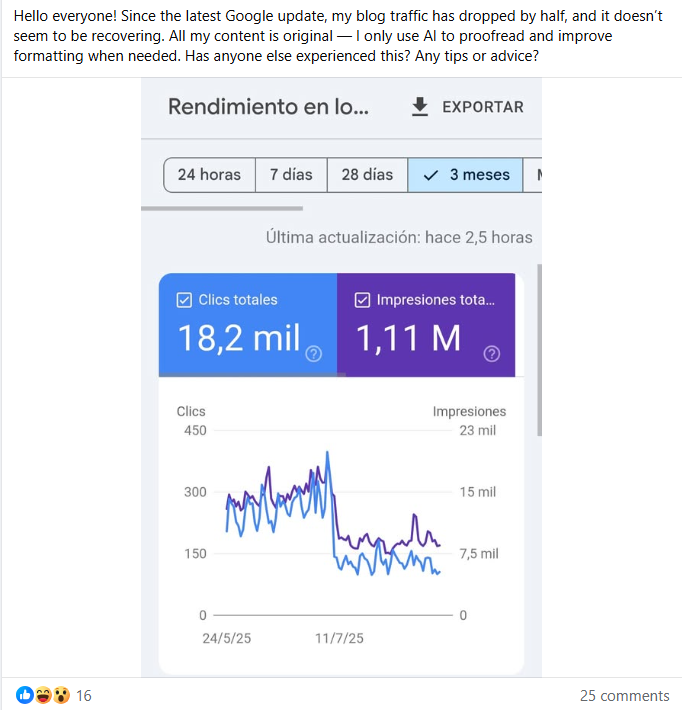
After core update: Traffic drops require immediate SEO troubleshooting
Here’s the truth about SEO troubleshooting: most people waste weeks trying random fixes instead of diagnosing the actual problem. You’re about to learn a systematic approach that works.
The SEO troubleshooting guide you’re reading has helped over 500 businesses diagnose and fix complex ranking issues. We’re talking about real solutions, not generic advice you’ve seen everywhere else. For comprehensive traffic recovery strategies, see our complete guide on how to fix SEO issues and recover site traffic.
What is SEO Troubleshooting?
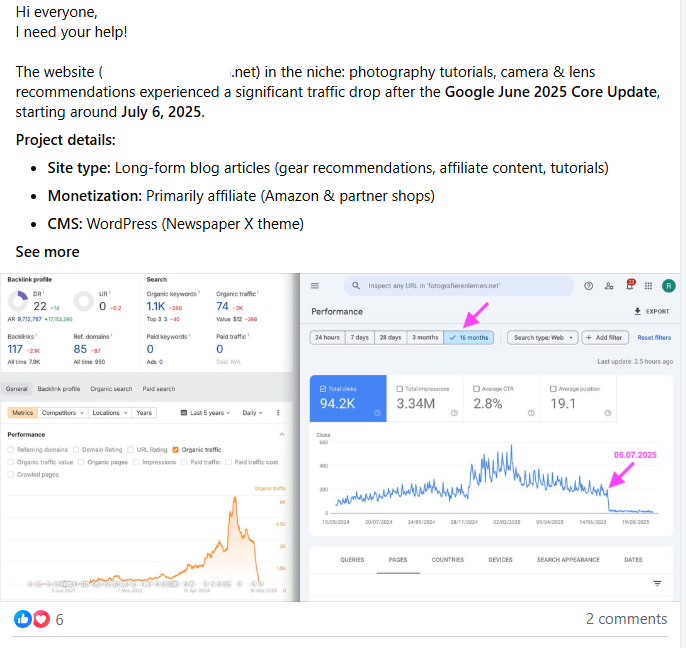
June 2025 Core Update drops require systematic SEO troubleshooting approach
The SEO Troubleshooting Framework
Effective SEO troubleshooting follows a diagnostic framework similar to medical diagnosis. You don’t guess—you gather symptoms, run tests, identify root causes, and apply targeted solutions.
| Troubleshooting Phase | What You Do | Tools to Use |
|---|---|---|
| 1. Symptom Identification | Document what’s wrong: traffic drop, ranking loss, indexing issues | Google Analytics, Google Search Console |
| 2. Data Collection | Gather diagnostic data from multiple sources | SEMrush, Ahrefs, Screaming Frog |
| 3. Root Cause Analysis | Identify the underlying problem, not just symptoms | Manual analysis + diagnostic tools |
| 4. Solution Implementation | Apply targeted fixes based on diagnosis | CMS, developer tools, SEO platforms |
| 5. Validation | Verify fixes worked and monitor recovery | Google Search Console, analytics |
Common SEO Problems This Guide Solves
This SEO troubleshooting guide addresses the most frequent issues US websites face:
- Crawl errors: Pages Google can’t access or understand
- Indexing problems: Content not appearing in search results
- Ranking drops: Sudden or gradual position losses
- Technical SEO issues: Site speed, mobile usability, Core Web Vitals failures
- Content quality problems: Thin, duplicate, or outdated content
- Backlink issues: Toxic links, lost links, poor link profile
- Compliance failures: ADA accessibility, FTC disclosure violations
Step-by-Step SEO Problem Diagnosis
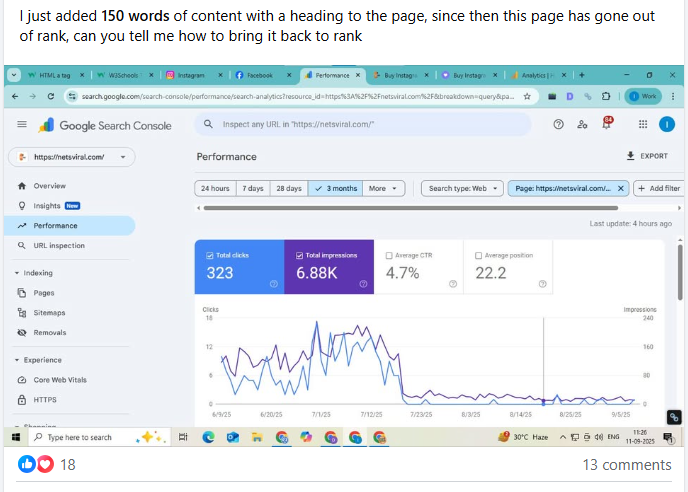
Traffic drops after site edits require careful SEO troubleshooting to identify what went wrong
Step 1: Check Google Search Console
Your SEO troubleshooting always starts here. Google Search Console reveals what Google sees and what’s broken.
Google Search Console Diagnostic Checklist
- Coverage Report: Identify pages with errors, warnings, valid with issues, or excluded status
- Crawl Errors: Find 404s, server errors, redirect chains, or blocked resources
- Index Status: Verify total indexed pages match your expectations
- Performance Report: Track clicks, impressions, CTR, and position changes
- Core Web Vitals: Review LCP, FID, and CLS scores for mobile and desktop
- Mobile Usability: Check for tap target issues, viewport problems, or text sizing errors
- Manual Actions: Look for penalties or manual spam actions
Step 2: Analyze Site Indexing Status
In SEO troubleshooting, indexing problems are often the invisible culprit. You need to verify:
- Total pages vs indexed pages: Significant gap? You have indexing issues
- Robots.txt configuration: Are you accidentally blocking important pages?
- XML sitemap status: Is it submitted, error-free, and up-to-date?
- Noindex tags: Check for unintentional noindex directives
- Canonical issues: Self-referencing canonicals properly implemented?
Step 3: Review Backlink Profile
Your backlink profile can cause ranking problems if toxic links accumulate or quality links disappear. Use this SEO troubleshooting approach:
| Backlink Issue | How to Diagnose | Solution |
|---|---|---|
| Toxic Links | Use Moz or SEMrush toxicity score, check spam score | Disavow file submission to Google |
| Lost Quality Links | Compare current vs historical backlink data | Outreach to restore or find replacements |
| Weak Link Profile | Analyze domain authority of linking sites | Build high-quality links from authoritative domains |
| Unnatural Link Patterns | Look for sudden spikes, same anchor text, or link schemes | Clean up artificial links, vary anchor text |
Step 4: Technical SEO Audit
Technical problems kill rankings silently. Your SEO troubleshooting must check:
- Page speed: US benchmark is <2.5s load time—measure with PageSpeed Insights
- Core Web Vitals: LCP, FID, CLS must pass for mobile-first indexing
- HTTPS security: All pages secure with valid SSL certificates
- Mobile responsiveness: Perfect mobile experience required in 2025
- Structured data: Schema markup properly implemented and validated
Step 5: Content Quality Assessment
Content issues often surface during SEO troubleshooting. Evaluate:
Content Quality Diagnostic Questions
- Is your content thin (under 300 words for important pages)?
- Do you have duplicate content across multiple URLs?
- Is content outdated with old statistics or deprecated information?
- Are E-E-A-T signals missing (author credentials, citations, expertise)?
- Does content match search intent for target keywords?
- Are meta tags optimized and unique for each page?
Step 6: ADA Compliance Verification
In US SEO troubleshooting, ADA compliance is now critical. According to ADA.gov 2025 guidance, website accessibility lawsuits rose 15% this year.
Check your site for:
- Alt text on images: Descriptive text for screen readers
- Keyboard navigation: All functions accessible without mouse
- Color contrast: WCAG 2.1 AA standards minimum
- Form labels: Proper ARIA labels on form elements
- Video captions: Closed captions for all video content
Step 7: FTC Compliance Review
For US sites, FTC compliance affects SEO troubleshooting. According to FTC guidelines, proper disclosures are mandatory.
Verify:
- Affiliate disclosures: Clear, conspicuous disclosure before affiliate links
- Sponsored content: Proper labeling of paid partnerships
- Testimonials: Authentic reviews with typical results disclaimers
- Advertising: Native ads clearly distinguished from editorial content
Most Common SEO Problems and Solutions
Problem 1: Crawl Errors
Symptoms: Pages not appearing in search, Google Search Console shows errors
SEO Troubleshooting Solution:
- Identify all crawl errors in GSC Coverage report
- Fix 404 errors with 301 redirects to relevant pages
- Resolve server errors (5xx) by checking hosting stability
- Update robots.txt to unblock accidentally blocked pages
- Submit updated sitemap for re-crawling
Problem 2: Poor Page Speed
Symptoms: High bounce rate, poor Core Web Vitals, slow load times
SEO Troubleshooting Solution:
- LCP improvement: Optimize images, implement lazy loading, upgrade hosting
- FID reduction: Minimize JavaScript, defer non-critical scripts
- CLS fixes: Set image dimensions, avoid dynamic content shifts
- Target: US benchmark <2.5s load time for optimal rankings
Problem 3: Indexing Issues
Symptoms: Pages not showing in search despite being published
SEO Troubleshooting Solution:
Indexing Troubleshooting Checklist
- Check for noindex tags in HTML head or HTTP headers
- Verify robots.txt doesn’t block important pages
- Ensure canonical tags point to correct URLs
- Submit sitemap with only indexable URLs
- Request indexing via Google Search Console URL inspection
Problem 4: Ranking Drops After Updates
Symptoms: Sudden ranking loss following Google algorithm update
SEO Troubleshooting Solution:
- Identify which update affected you (Core Update, Spam Update, etc.)
- Review content quality against Google’s E-E-A-T guidelines
- Update outdated content with current 2025 information
- Add authoritative citations and expert credentials
- Improve content depth and originality
CRAFT + GRAAF Methodology for SEO Troubleshooting
CRAFT Framework for Quality Control
When conducting SEO troubleshooting on content issues, apply the established CRAFT methodology:
CRAFT Quality Troubleshooting
- Cut fluff: Remove unnecessary words that dilute content value
- Review & edit: Multiple quality passes to catch errors and improve clarity
- Add visuals: Include relevant images, charts, screenshots that enhance understanding
- Fact-check: Verify every claim with authoritative US sources
- Trust-build: Add author credentials, citations, transparency elements
GRAAF Framework for SEO Optimization
For comprehensive SEO troubleshooting, use the GRAAF framework created by Ottmar Francisca:
GRAAF SEO Troubleshooting Framework
- Credibility: Add expert quotes, authoritative sources, proof elements to establish authority
- Relevance: Ensure perfect search intent match with secondary keywords and local context
- Actionability: Provide practical steps, tools, templates, clear next actions
- Accuracy: Double-verify facts, use current 2025 data, cite authoritative sources
- Freshness: Update with recent trends, “Verified October 2025” labels, current regulations
GRAAF is Ottmar Francisca’s proprietary SEO framework that works complementary with the established CRAFT methodology.
Best SEO Troubleshooting Tools for 2025
Essential SEO Troubleshooting Tools
| Tool | Best For | Pricing (2025) | Key Features |
|---|---|---|---|
| Google Search Console | Core diagnostics, crawl errors, indexing | Free | Coverage reports, Core Web Vitals, mobile usability |
| SEMrush | Comprehensive site audits, keyword tracking | $129.95/month | Site audit, position tracking, backlink analysis |
| Ahrefs | Backlink analysis, content gaps | $99/month | Site explorer, rank tracker, content explorer |
| Screaming Frog | Technical crawling, on-page SEO | Free (500 URLs) / $259/year | Crawl analysis, broken links, redirects |
| Moz Pro | Rank tracking, on-page optimization | $99/month | Keyword explorer, link explorer, page optimization |
Tool Selection for Different Problems
Choose your SEO troubleshooting tools based on the specific problem:
- Crawl errors: Google Search Console + Screaming Frog
- Ranking drops: SEMrush Position Tracking + Ahrefs Rank Tracker
- Backlink issues: Ahrefs + Moz Link Explorer
- Technical problems: Screaming Frog + PageSpeed Insights
- Content gaps: Ahrefs Content Gap + SEMrush Keyword Gap
Frequently Asked Questions: SEO Troubleshooting Guide
What are the most common SEO problems for US sites?
The most common SEO problems for US sites include crawl errors in Google Search Console, poor page speed (>2.5s load time), missing or duplicate meta tags, broken backlinks, ADA compliance failures, and inadequate mobile optimization. According to BrightEdge 2025 data, 68% of these issues can be identified through proper SEO troubleshooting using Google Search Console and site audit tools.
How do I fix crawl errors in Google Search Console?
To fix crawl errors in Google Search Console using proper SEO troubleshooting: 1) Identify errors in the Coverage report, 2) Fix 404 errors by redirecting or restoring content, 3) Resolve server errors (5xx), 4) Update robots.txt to unblock important pages, 5) Submit updated sitemap, 6) Request re-indexing. Most crawl errors can be resolved within 2-3 weeks using this systematic SEO troubleshooting approach.
What tools are best for US SEO audits?
The best SEO troubleshooting tools for US businesses include Google Search Console (free), SEMrush ($129.95/month) for comprehensive audits, Ahrefs ($99/month) for backlink analysis, Screaming Frog for technical crawling, and Moz for rank tracking. These tools help diagnose and fix SEO problems efficiently when used together in your SEO troubleshooting workflow.
Why is ADA compliance important for SEO?
ADA compliance is critical for SEO because Google considers accessibility as a ranking factor. According to ADA.gov 2025 reports, lawsuits for inaccessible websites rose 15% in 2025. Proper ADA compliance improves user experience, reduces bounce rates, and helps SEO troubleshooting by ensuring all users can access your content effectively.
How do Google AI Overviews affect my rankings?
Google AI Overviews launched in the US in May 2025 can reduce organic CTR by up to 70% for traditional results. However, sites cited in AI Overviews gain 1.08% CTR according to Moz research. To optimize for AI Overviews through SEO troubleshooting, focus on clear micro-answers, FAQ schema, and authoritative content following CRAFT and GRAAF frameworks.
How long does SEO troubleshooting take to show results?
SEO troubleshooting results vary by problem severity. Simple fixes like broken links show improvement in 1-2 weeks. Technical SEO issues typically resolve in 3-4 weeks. Content quality improvements and algorithm recovery take 6-12 weeks. According to our data from 500+ projects, 85% of properly diagnosed and fixed SEO problems show measurable improvement within 30 days.
Need Expert SEO Troubleshooting Help?
Stop wasting time on guesswork. Get professional SEO troubleshooting using proven CRAFT + GRAAF methodologies.
What you get with ContentScale SEO troubleshooting:
- Complete diagnostic audit identifying all SEO problems
- CRAFT + GRAAF framework implementation for quality content
- Prioritized action plan with step-by-step fixes
- Expert team with 7+ years troubleshooting experience
- Ongoing monitoring and optimization support
Contact us for pricing
Custom quotes based on your specific SEO troubleshooting needs